

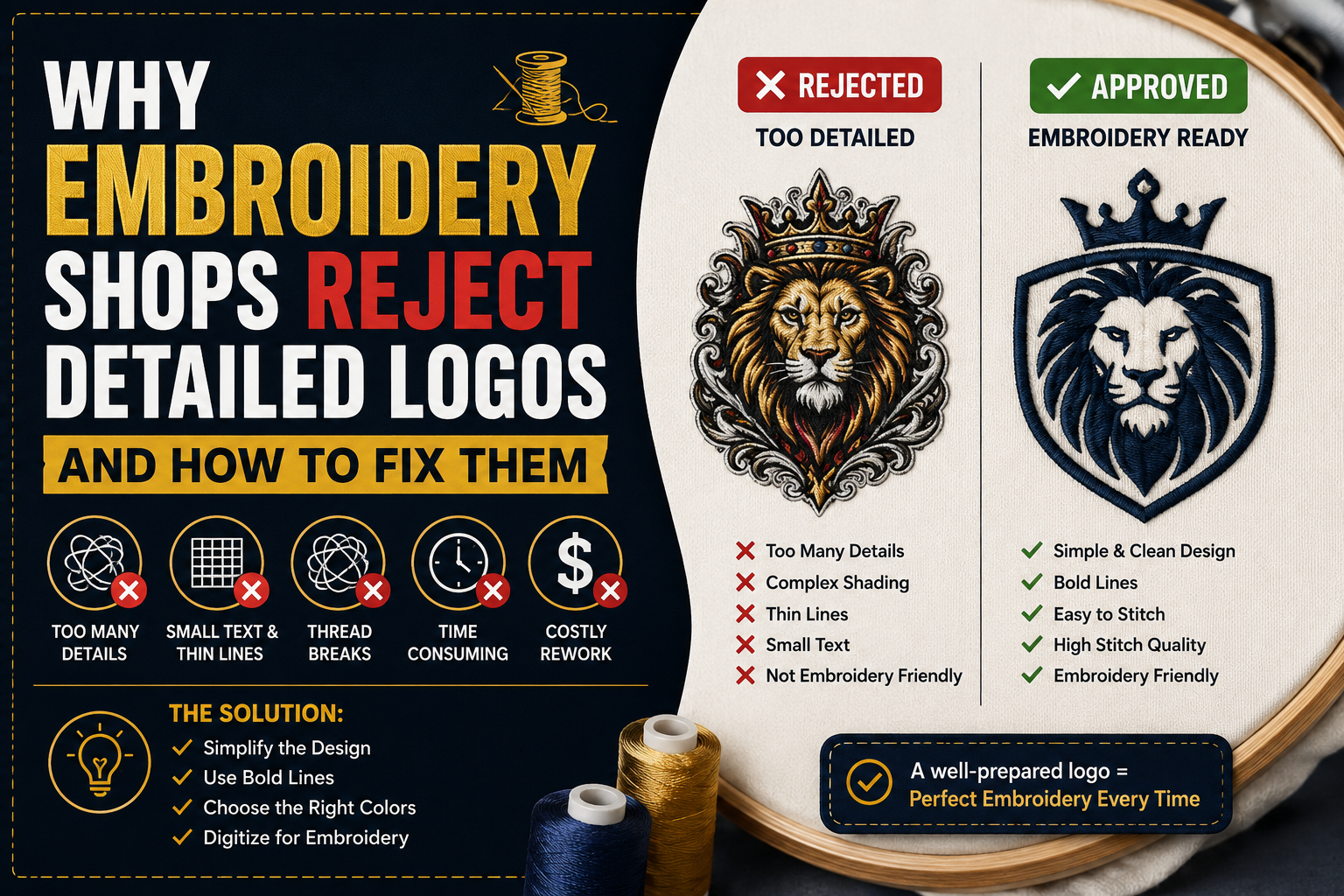
Embroidery shops reject logos every day. If yours has come back with a message like “this design is too detailed for embroidery,” “we cannot stitch this file as submitted,” or simply “we need a different version of your logo,” you are not alone — and the problem is more fixable than it might seem.
The reason embroidery shops reject logos is not arbitrary. It comes down to the fundamental physical reality of how embroidery works: needle, thread, and fabric. Understanding those limits is the first step to understanding why your logo was rejected and exactly what needs to change for it to be accepted and stitched well.
This guide covers everything — why embroidery is categorically different from print, the specific design elements that cause rejection, the technical file requirements that separate good embroidery artwork from bad, and how to get a logo that not only gets accepted but looks genuinely excellent on a finished garment.
Why embroidery shops reject logos — and how to fix each one
| Rejection reason | Why it fails | The fix | How common |
|---|---|---|---|
| Text too small | Letters below 0.25 inch collapse — stitches cannot reproduce thin strokes, serifs, or counter spaces at that scale | Enlarge text or switch to a bolder weight for the embroidery version | Very common |
| Lines too thin | Strokes below 1mm cannot hold thread reliably — they skip, pucker, or produce broken and uneven coverage | Thicken all strokes to a minimum of 1mm width throughout the design | Very common |
| Gradients in design | Thread is solid color — no smooth blend is achievable in standard spot color embroidery production | Convert all gradient areas to flat solid color fills before submitting | Very common |
| Too many colors | Each color requires the machine to stop and re-thread — above 6 colors adds significant cost and registration risk | Consolidate the design to 6 colors or fewer for standard production | Common |
| Fine details too small | Elements below 2-3mm cannot be reproduced — individual stitches exceed the element size at that scale | Remove fine details from the embroidery version or enlarge to minimum 2-3mm | Common |
| Raster file submitted | PNG and JPG edges are blurry — the digitizer cannot accurately read paths or color boundaries for stitch planning | Get a clean vector file — AI or EPS — before submitting to the embroidery shop | Common |
| Wrong file format | Stitch files (DST, PES) from previous jobs have wrong parameters — size, fabric type, and density do not match | Submit clean vector artwork only — let the shop digitize for your specific job | Occasional |
Embroidery minimum specifications
| Element | Minimum spec | What happens below minimum | Fix |
|---|---|---|---|
| Text height | 0.25″ apparel 0.30″ caps |
Letterforms collapse — thin strokes, serifs, and counters cannot be reproduced cleanly in thread at this scale | Enlarge text |
| Line width | 1mm minimum | Lines skip or pucker — thread cannot hold consistently on strokes thinner than approximately one thread diameter | Thicken lines |
| Detail size | 2–3mm minimum | Shapes are mechanically unreliable — individual stitches exceed the element size and produce unclean results | Remove or enlarge |
| Color count | 1–6 colors ideal | Each additional color adds machine stops, cost, and registration risk — above 6 becomes production-heavy | Consolidate colors |
| Gradients | Not supported | No smooth thread blend is possible in standard embroidery — simulated gradients look visibly different from digital | Convert to flat fill |
| File format | AI or EPS vector | Raster files create blurry edge references — the digitizer cannot accurately map stitch paths from pixel data | Vectorize first |
Embroidery placement size guide
| Placement | Typical size | Max colors | Design notes |
|---|---|---|---|
| Left chest | 3–4 inches wide | 4–6 colors | Most common placement — all minimums apply, text 0.25 inch minimum, all lines 1mm minimum width |
| Cap front | 2.25 × 2 inches max | 4–6 colors | Tightest constraints of any placement — text must be 0.3 inch minimum, complex logos need simplification |
| Full back | 10 × 10 inches typical | 8–12 colors | More detail achievable at scale — but minimums still apply and large placements need careful path sequencing |
| Sleeve | 2–3 inches wide | 2–4 colors | Limited area — simplified logo or wordmark only, complex designs need significant simplification for this placement |
| Patch | 3–5 inches typical | Up to 8 colors | Stable twill base allows slightly finer detail than garment embroidery — same text and line minimums still apply |
Why Embroidery Is Fundamentally Different From Print
The single most important thing to understand about embroidery is that it is not printing. This sounds obvious, but the implications are not obvious to most people until a logo is rejected.
When you print a design — whether digitally, by screen, or by offset — you are depositing ink onto a flat surface. Ink can be applied in any thickness, any color gradient, any level of fine detail. The resolution of the original artwork determines how precisely the design reproduces, and with modern printing technology that resolution can be extremely high.
Embroidery works entirely differently. <cite index=”2-1″>Digitizing is the process of manually recreating artwork as machine-readable stitch instructions — mapping every stitch type, direction, density, underlay, and sequence. The digitizer must compensate for how fabric stretches and distorts under needle tension, lay invisible foundation stitches to prevent puckering, and plan the stitch sequence to minimize thread trims and color changes.</cite>
<cite index=”7-1″>Logo digitizing is not image-to-thread conversion. It is stitch engineering. And the quality of that engineering determines whether your embroidered logo looks sharp on a work jacket after 100 washes or starts fraying after five.</cite>
This is why embroidery has hard physical limits that printing does not. Thread is a physical object with a minimum width. A needle makes a hole of a fixed size. Stitches have a minimum and maximum practical density. Fabric stretches under tension in predictable ways that the digitizer must account for. These constraints cannot be engineered away — they are properties of the medium itself.
A logo designed for digital or print use, with gradients, thin lines, small text, and fine detail, has been designed for a medium without these constraints. When you try to translate it directly to embroidery, the constraints assert themselves. The embroidery shop is not being difficult when they reject a detailed logo — they are telling you that the design as submitted cannot be reproduced accurately in thread on fabric.
The Specific Reasons Embroidery Shops Reject Logos
Understanding exactly which design elements cause rejection makes the fix far more straightforward. Here are the most common reasons, in order of how frequently they appear.
Reason 1: Text That Is Too Small
Text is one of the most common rejection causes. <cite index=”5-1″>Text and graphics should use solid colors, with text no smaller than 0.25 inches in height to maintain legibility.</cite> This minimum applies to standard embroidery on apparel. For caps, where the embroidery area is smaller and the hoop limits precision, the practical minimum is closer to 0.3 inches.
Below these thresholds, the letterforms become so small that individual stitches cannot reproduce the details of the characters. Thin strokes within letters — the serifs of a serif font, the crossbar of a capital H, the counter space inside an O — collapse under the minimum thread width. What reads as crisp text in a digital file becomes an illegible blob of thread on the finished garment.
The fix is straightforward: text below the minimum size needs to be either enlarged, simplified to a bolder weight, or removed from the embroidered version of the logo. Many brands maintain a separate simplified logo version specifically for embroidery that removes or enlarges elements that would not survive the medium.
Reason 2: Lines That Are Too Thin
<cite index=”9-1″>Embroidery has strict physical limits: minimum 0.25 inch text height, 1mm line width, and 2-3mm detail size.</cite> A line thinner than 1mm cannot hold a stitch reliably. The thread will either skip, pucker around the line, or produce uneven, broken coverage that looks nothing like the original design.
This is particularly problematic for logos that use fine outlines, thin decorative borders, or intricate linework. A clean, elegant thin-line logo that looks sophisticated in print becomes technically impossible in embroidery — the lines are simply below the physical threshold of what thread can reproduce.
The solution is to thicken any lines below 1mm to at least that minimum, which changes the visual weight of the design but is the only way to get clean, consistent results on the garment.
Reason 3: Gradients and Color Blends
Gradients are one of the clearest examples of a print design convention that has no equivalent in embroidery. Thread is a solid color. You cannot blend thread smoothly from one color to another the way ink blends on paper.
Gradient effects in embroidery are simulated through techniques like varying stitch density or alternating thread colors in a pattern — but these are approximations that look noticeably different from a smooth digital gradient, require significant additional digitizing time, and add cost. Many embroidery shops decline gradient-heavy logos outright rather than attempt a simulation that the client may not find acceptable.
For standard embroidery production, gradients need to be converted to flat, solid color fills. A logo with a gradient from dark blue to light blue needs to choose one blue — or be redesigned with clearly defined color regions rather than a continuous blend.
Reason 4: Too Many Colors
<cite index=”4-1″>Most embroidery is limited to 1-6 thread colors. Some shading or effects may need to be flattened.</cite> Each color change requires the machine to stop, cut the thread, and re-thread with a new color. This adds time, cost, and potential for registration errors where colors meet.
A logo with eight distinct colors is technically possible to embroider, but it is slow, expensive, and often not visually necessary — many of those colors may be too similar to distinguish in thread form anyway. Logos with more than six colors are frequently returned with a request to reduce the color count, or quoted at a premium that surprises the client.
The fix involves identifying which colors in the logo are genuinely necessary for the design to be recognizable and effective, and consolidating the rest. This is a design judgment call that benefits from the input of whoever is redrawing the logo for embroidery production.
Reason 5: Fine Detail That Is Too Small
Beyond text and lines, any detail smaller than 2-3mm cannot be reliably reproduced in embroidery. Small icons, decorative elements within a badge design, fine crosshatching, intricate star shapes — all of these fall below the practical resolution of machine embroidery.
<cite index=”4-1″>Thin lines, gradients, and tiny text will not stitch well. Blockier, high-contrast designs translate best.</cite> The physical reality is that embroidery thread has a diameter, and reproducing shapes that are only a few thread diameters wide is mechanically unreliable.
Fine details need to be either removed from the embroidery version of the logo or enlarged to meet the minimum size threshold. This is not a limitation of skill — it is a property of the medium.
Reason 6: Poor Source Artwork
Beyond design-specific limitations, the quality of the artwork file itself causes rejections. <cite index=”2-1″>A vector file — AI, EPS, SVG, PDF with vector paths — gives the digitizer clean, scalable outlines. The digitizer can work directly from the paths, which produces the best results fastest.</cite>
Raster files — PNG, JPG, screenshots — require the digitizer to trace the artwork manually, which adds time and cost and introduces interpretation errors. Heavily compressed JPGs or low-resolution PNGs with blurry edges make this tracing process significantly harder and the results less accurate.
<cite index=”8-1″>Low-quality imagery leads to inaccurate stitching.</cite> This is not a preference — it is a direct cause-and-effect relationship. The digitizer can only be as accurate as the reference they are working from.
The fix for artwork quality is vectorization: having the logo manually redrawn as a clean vector file before it goes to the embroidery digitizer. A clean vector gives the digitizer everything they need to produce accurate, high-quality stitch work.
Reason 7: Wrong File Format
<cite index=”7-1″>Your embroidery machine cannot read a JPG, PNG, SVG, or PDF. It reads a machine-specific stitch file. The most common format is DST (Tajima), which runs on most commercial machines.</cite>
Many people confuse the embroidery production file format with the artwork file format. The artwork file — what you submit to the embroidery shop — should be a clean vector file: AI, EPS, or SVG. The embroidery shop’s digitizer then converts that artwork file into the machine-readable stitch file (DST, PES, JEF, or other formats depending on the machine).
Submitting a DST or PES file you found online, or a file that was previously digitized for a different use, is also a common mistake. These files are tied to specific garment types, fabric weights, and size parameters. A digitized file for a left-chest polo logo at 3 inches does not translate to a back placement at 10 inches — it needs to be redigitized for the new application.
What Makes a Logo Embroidery-Ready
Rather than a list of what not to do, here is what an embroidery-ready logo actually looks like:
Clean vector paths. Every shape is a mathematically defined path — no embedded raster images, no pixel data. <cite index=”5-1″>Vector files give the artwork team clean, scalable artwork needed to convert the logo into stitches without losing any detail.</cite> The digitizer reads directly from the paths to plan stitch routes.
Solid flat colors. Every color is a flat, opaque fill with no gradients, transparency effects, or blends. Each color should correspond to a specific thread color — ideally matched to Pantone thread values so the shop can identify the correct thread from their inventory.
Separated color layers. Each color is on its own clearly defined, non-overlapping layer. This makes color sequencing straightforward for the digitizer and prevents coverage problems at color boundaries.
Appropriate minimum sizes. All text is at least 0.25 inches tall, all lines are at least 1mm wide, and all individual design elements are at least 2-3mm in their smallest dimension.
Reduced color count. The design uses no more than six colors — ideally four or fewer for standard production efficiency.
No gradients. Every area that would be a gradient in the original digital version has been simplified to a flat color or clearly defined color regions.
Proper file format. The file is submitted as a clean AI or EPS file — not a raster image, not a previously digitized stitch file from a different application.
A logo that meets all of these criteria will be accepted by any professional embroidery shop. It will also produce significantly better stitch quality, require fewer revisions during digitizing, and result in a finished garment that accurately represents the brand.
The Role of Vector Artwork in Embroidery Quality
<cite index=”7-1″>Vector artwork uses mathematical paths, not pixels, so shapes stay sharp at any size. This makes stitch path planning accurate and reduces digitizing time.</cite>
When a digitizer works from a clean vector file, they can read the paths directly, identify the color regions precisely, and make accurate stitch planning decisions without guessing about what a blurry edge was meant to look like. The result is more accurate digitizing, fewer revision rounds, and better final quality.
When a digitizer works from a raster file — even a high-quality one — they are tracing from a pixel reference that has inherent limitations. Anti-aliased edges create ambiguity about where one color ends and another begins. Compression artifacts add noise to what should be clean boundaries. Fine details that are clear in vector form are blurry or absent in raster form.
This is why the standard advice from professional embroidery shops is always to provide vector artwork. It is not about file format snobbery — it is about giving the digitizer the most accurate possible reference, which directly affects the quality of the finished garment.
For businesses whose logos only exist as raster files — a PNG on a website, a JPG in an email, a screenshot — the solution is professional manual vectorization before submitting to the embroidery shop. A skilled vector artist manually rebuilds the logo as a clean vector file, with flat color fills, proper color separation, and all elements sized correctly for embroidery production.
This is exactly the service Vector Refinery provides. The Premium package specifically includes embroidery optimization — the additional work of checking all element sizes against embroidery minimums, simplifying or flagging elements that fall below threshold, and delivering a file structured for clean digitizing rather than just general vector use.
How to Fix a Rejected Logo
If your logo has been rejected by an embroidery shop, here is the practical path to getting it accepted and stitched well.
Step 1: Identify exactly why it was rejected. Ask the shop to specify which elements are causing the problem. Is it the small text? The thin lines? The gradient? The file format? The more specific the feedback, the more targeted the fix can be.
Step 2: Get the logo properly vectorized if the source file is raster. If you submitted a PNG or JPG, the first fix is getting a clean vector version. A professional manual vectorization service can rebuild your logo as a clean AI or EPS file from any raster source.
Step 3: Have the vector file optimized for embroidery. Standard vectorization produces a file ready for print and general use. Embroidery optimization is an additional step — checking minimum sizes, simplifying gradients to flat colors, reducing color count if needed, and structuring the file specifically for clean digitizing. This is what Vector Refinery’s Premium package includes.
Step 4: Resubmit to the embroidery shop. With a clean, embroidery-optimized vector file in hand, resubmit. The digitizer now has everything they need to produce accurate, high-quality stitch work.
Step 5: Review the digitized proof before production. Most professional shops provide a stitch-out proof — a physical sample stitched on a swatch of fabric — before running the full production order. Review this carefully and request any adjustments before approving the full run.
When a Logo Needs a Simplified Embroidery Version
Sometimes the gap between the original logo and what is achievable in embroidery is significant enough that a separate simplified version makes more sense than trying to force the original into embroidery constraints.
This is particularly common with logos that have very fine detail, small text, or complex illustrations — designs that are built around visual complexity that does not translate to thread. Rather than producing a compromised version of the original that neither looks like the intended design nor stitches cleanly, a simplified embroidery version preserves the essential brand identity while eliminating the elements that do not work in the medium.
A simplified embroidery version typically involves removing the finest details and retaining only the elements that stitch cleanly, consolidating colors to the fewest necessary for brand recognition, enlarging text to meet minimum height requirements, and thickening lines to meet minimum width requirements.
The result is a logo that is recognizably the same brand but built for thread rather than pixels. Many professional brand guidelines include an embroidery version alongside print and digital versions specifically for this reason.
Embroidery-Specific Size Guidelines
Different embroidery placements have different practical constraints based on the available hoop area and the scale of the finished design. Here is a practical reference:
Left chest logo — the most common placement — typically runs 3 to 4 inches wide. At this size, the minimums described above apply: 0.25 inch text, 1mm lines, 2-3mm details.
Cap embroidery — the available area is narrower and the structured fabric creates additional constraints. <cite index=”9-1″>Cap embroidery specs: maximum width 2.25 inches on most caps, maximum height 2 inches, with 4-6 colors recommended and text at 0.3 inches minimum height.</cite> Complex logos frequently need simplification for cap use.
Full back placement — larger area allows more detail and more colors. <cite index=”9-1″>Large back specs: common size 10 by 10 inches, maximum 12 by 14 inches, with up to 8-12 colors possible and more detail achievable.</cite> Even at large sizes, the minimum thread width means the finest details still cannot be reproduced.
Patches — embroidered patches have slightly different constraints because the base material (usually twill) is more stable than garment fabric, allowing slightly finer detail. However, the same minimums for text and line weight still apply.
Understanding which placement your order is for affects which elements of the logo need attention before submission.
Get Your Logo Embroidery-Ready With Vector Refinery
Vector Refinery specializes in preparing logos for embroidery production — from manual vectorization of raster source files through full embroidery optimization that checks every element against production minimums.
The Premium package specifically covers embroidery-ready preparation: clean vector paths, flat color separation, element size review, gradient simplification, and file structure optimized for digitizing. Every project is 100% manually redrawn — no auto-trace, no shortcuts.
Over 500 completed projects. 5.0 client rating. Top Rated on Upwork. Packages starting at $25, with the embroidery-optimized Premium package at $85. A free assessment is available before any payment is required — upload your logo and get an exact quote and turnaround time specific to your project.
Get your logo print-ready in 24 hours
Upload your PNG, JPG, or screenshot. A free assessment with exact price and turnaround is included before you pay anything.
Frequently Asked Questions
Why did the embroidery shop say my vector file is not suitable? Having a vector file format (AI, EPS, SVG) does not guarantee the artwork meets embroidery production requirements. The design itself may have elements below minimum size thresholds, gradients that cannot be reproduced in thread, or too many colors for efficient production. Embroidery optimization is an additional step beyond standard vectorization.
Can any logo be embroidered? Almost any logo can be embroidered in some form, but highly complex logos may need simplification to produce a quality result. Very fine detail, very small text, and gradients need to be addressed before embroidery production. In some cases, a simplified embroidery version of the logo is the right outcome rather than forcing an unsuitable design into the medium.
What is the minimum text size for embroidery? The industry standard minimum is 0.25 inches in height for standard apparel embroidery, and 0.3 inches for cap embroidery. Text below these thresholds will not stitch cleanly — the letterforms collapse at that scale.
How many colors can an embroidered logo have? Most standard embroidery production works best with one to six thread colors. Designs with more than six colors are possible but add cost and production complexity. Designs with more than twelve colors are generally not practical for standard production.
What file should I send to an embroidery shop? Send a clean vector file — AI or EPS preferred. The embroidery shop’s digitizer will convert it to the machine-readable stitch file (DST, PES, or similar) required for their specific equipment. Do not send a previously digitized stitch file from a different application, as it will have been optimized for different parameters.
Does Vector Refinery produce the actual stitch file (DST/PES)? Vector Refinery produces the embroidery-optimized vector artwork — the clean AI and EPS files that an embroidery digitizer needs to produce accurate stitch work. The digitizer at the embroidery shop converts that artwork into the machine-specific stitch file. This is the correct workflow: artwork preparation and stitch file creation are separate steps handled by separate specialists.
Published by Vector Refinery — Professional Embroidery Vector Artwork Preparation and Manual Logo Vectorization Service. Visit vectorrefinery.com to upload your logo and get a free embroidery-ready assessment today.
