

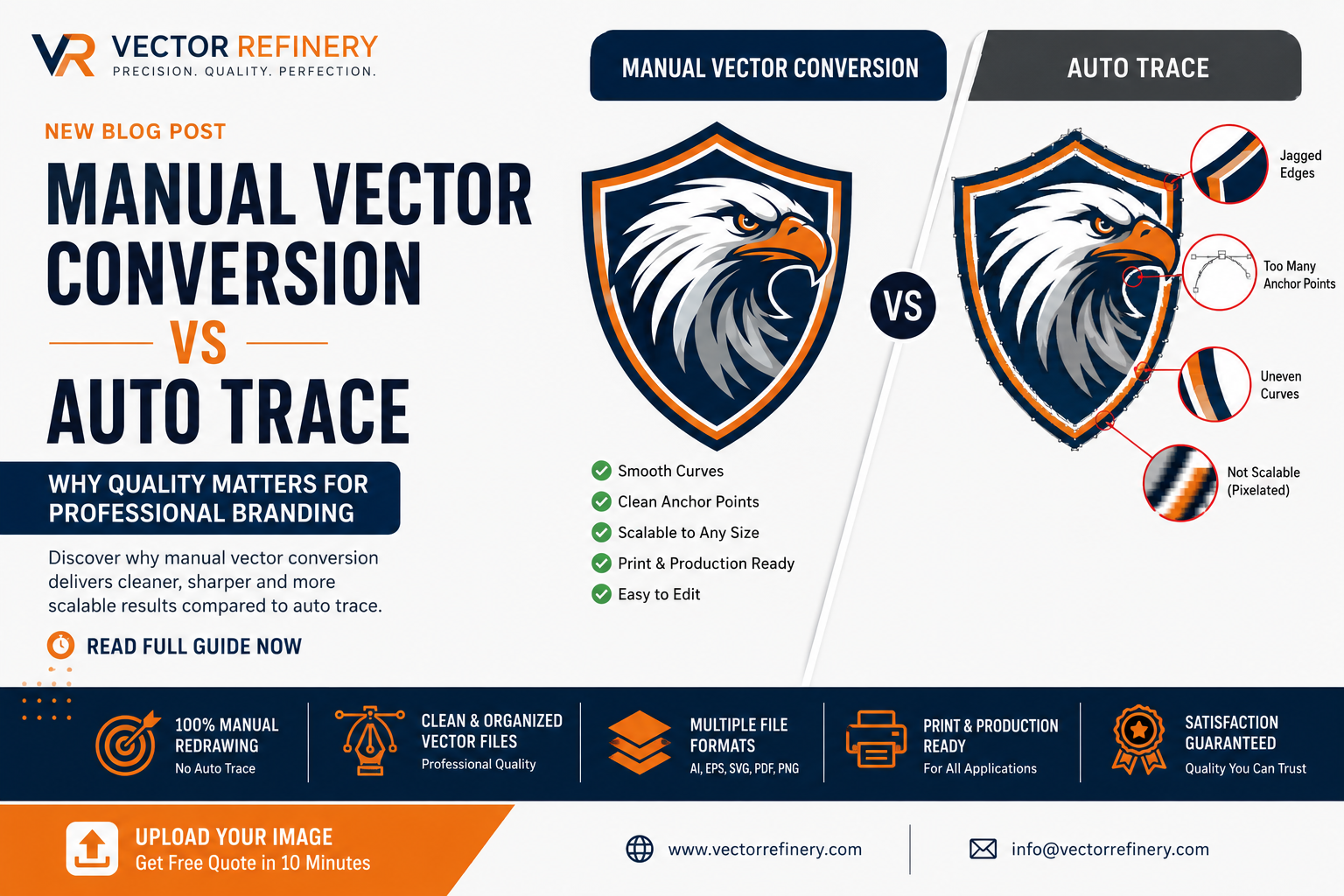
In today’s digital world, businesses rely on logos, graphics, and illustrations across websites, social media, packaging, signage, uniforms, promotional materials, and printed marketing assets. While creating a graphic is relatively easy, ensuring that artwork remains sharp and professional at every size is a different challenge altogether.
Many businesses discover this problem when they attempt to enlarge a logo originally saved as a JPG, PNG, or screenshot. The image becomes blurry, pixelated, and unsuitable for professional use. This is where vector conversion becomes essential.
However, not all vector conversion services deliver the same results. Some providers depend heavily on automated tracing software, while others manually recreate artwork with precision and attention to detail.
In this guide, we’ll explore the differences between manual vector conversion and auto trace, why quality matters, and how professional vector artwork can strengthen your brand identity.
What Is Vector Conversion?
Vector conversion is the process of transforming a raster image into a scalable vector format.
Raster images include:
- JPG
- JPEG
- PNG
- GIF
- BMP
- Screenshots
- Scanned logos
These files are made up of pixels. When enlarged, the pixels become visible and the image loses quality.
Vector files are created using mathematical paths rather than pixels. This allows them to scale infinitely without losing clarity.
Common vector formats include:
- AI
- EPS
- SVG
- DXF
A properly created vector file remains crisp whether it appears on:
- Business cards
- Websites
- Social media graphics
- Product packaging
- Trade show displays
- Vehicle wraps
- Building signage
Why Businesses Need Vector Files
Many business owners don’t realize they need vector artwork until they encounter a production issue.
Common situations include:
Large Format Printing
A logo that looks acceptable online may become blurry when printed on a banner, billboard, or storefront sign.
Embroidery
Embroidery machines require clean artwork. Low-quality images often produce poor stitching results.
Screen Printing
Apparel printing demands precise vector artwork to ensure clean edges and accurate color separation.
Brand Consistency
Using different versions of a logo can create inconsistency across marketing materials.
Vector files help maintain a professional appearance across every platform and application.
The Problem with Auto Trace
Many online tools promise instant vector conversion.
These tools typically use automated tracing algorithms to detect shapes and convert pixels into paths.
While auto trace may seem convenient, it often creates significant quality issues.
Common Auto Trace Problems
- Jagged edges
- Excessive anchor points
- Distorted typography
- Uneven curves
- Inaccurate shapes
- Poor scalability
- Difficult file editing
At first glance, the artwork may appear acceptable.
However, when viewed closely or used professionally, flaws become obvious.
What Is Manual Vector Conversion?
Manual vector conversion involves recreating artwork by hand using professional vector software such as Adobe Illustrator.
Rather than relying on automated algorithms, a designer redraws:
- Shapes
- Curves
- Lines
- Typography
- Icons
- Illustrations
This process creates clean, precise, and production-ready artwork.
Manual vector conversion requires experience, technical knowledge, and attention to detail.
The result is significantly superior to automated tracing.
Manual Vector Conversion vs Auto Trace
Accuracy
Manual conversion recreates artwork precisely.
Auto trace often introduces distortions and inaccuracies.
File Cleanliness
Manual vector files contain organized paths and efficient structures.
Auto-traced files frequently contain thousands of unnecessary anchor points.
Scalability
Manual vectors remain sharp at any size.
Auto-traced artwork may reveal imperfections when enlarged.
Editability
Professionally redrawn vectors are easier to modify later.
Auto-traced files often become difficult to edit due to messy path structures.
Professional Printing
Manual vector artwork consistently produces better print results.
Why Clean Vector Artwork Matters
Many businesses underestimate the importance of clean vector construction.
Poorly built artwork can cause issues during:
- Printing
- Embroidery
- Laser cutting
- Vinyl cutting
- CNC routing
- Sign production
A professional vector file should include:
- Smooth curves
- Accurate geometry
- Clean anchor points
- Organized layers
- Proper color settings
These details directly affect production quality.
The Impact of Vector Quality on Branding
Your logo represents your business.
When customers see blurry or inconsistent graphics, it can affect their perception of your professionalism.
Professional vector artwork helps create:
- Brand trust
- Consistency
- Recognition
- Credibility
- Visual impact
Strong brands invest in quality because every visual detail contributes to customer confidence.
Common Files We Convert
Professional vector conversion services typically handle:
Logo Conversion
Transforming low-resolution logos into scalable vector artwork.
Image to Vector Conversion
Converting graphics, icons, and illustrations.
Sketch to Vector
Turning hand-drawn concepts into professional digital artwork.
Signature Vectorization
Creating clean scalable signatures for branding and print.
Artwork Recreation
Rebuilding damaged or outdated graphics.
PDF to Vector
Extracting and optimizing artwork from PDF documents.
Industries That Benefit from Vector Conversion
Construction Companies
Vehicle wraps, uniforms, signage, and promotional materials.
Real Estate Firms
Marketing collateral and property branding.
Apparel Brands
Screen printing and embroidery applications.
Restaurants
Menus, signage, packaging, and merchandise.
Manufacturers
Technical graphics and production artwork.
Marketing Agencies
Client branding and design projects.
Startups
Creating scalable brand assets from day one.
Signs Your Logo Needs Vectorization
You may need vector conversion if:
- You only have a JPG or PNG logo.
- Your logo appears blurry when enlarged.
- Your printer requests AI or EPS files.
- Your embroidery company needs vector artwork.
- You cannot edit your existing logo.
- Your original designer is unavailable.
- You need large-format printing.
These situations are common and can be resolved through professional vectorization.
The Professional Vector Conversion Process
A quality vector conversion project typically follows several steps.
Step 1: Artwork Assessment
The source image is evaluated for quality and complexity.
Step 2: Manual Redrawing
Shapes, typography, and graphics are recreated.
Step 3: Refinement
Curves and proportions are optimized.
Step 4: Color Matching
Brand colors are carefully reproduced.
Step 5: Quality Review
Artwork is inspected at multiple scales.
Step 6: Exporting
Files are prepared in various formats.
Vector File Formats Explained
AI
Adobe Illustrator source file.
EPS
Industry-standard format for printing.
SVG
Ideal for websites and digital platforms.
Universal format for sharing and printing.
DXF
Used for CNC and manufacturing applications.
Providing multiple formats ensures flexibility across projects.
Benefits of Professional Vector Conversion
Infinite Scalability
Artwork remains sharp at any size.
Better Print Quality
Produces cleaner results for commercial printing.
Easier Editing
Future updates become simpler.
Brand Consistency
Maintains a unified visual identity.
Production Readiness
Suitable for professional manufacturing processes.
Long-Term Value
One professional vector file can support years of marketing needs.
Why Businesses Choose Manual Vector Conversion
Businesses that prioritize quality understand that branding is an investment.
A professionally recreated vector logo can be used across:
- Websites
- Social media
- Packaging
- Merchandise
- Uniforms
- Advertising
- Vehicle graphics
- Signage
Rather than relying on quick automated solutions, professional vector conversion provides dependable results that support long-term growth.
Frequently Asked Questions
What is the difference between raster and vector?
Raster images use pixels, while vector graphics use mathematical paths that scale without quality loss.
Can you convert a blurry logo into a vector?
Yes. In most cases, artwork can be manually recreated from low-resolution files.
What file formats will I receive?
Typically AI, EPS, SVG, PDF, PNG, and JPG formats.
Is manual vector conversion better than auto trace?
Yes. Manual vector conversion produces cleaner, more accurate, and professionally usable artwork.
Can vector files be edited later?
Absolutely. Vector artwork is designed for future editing and customization.
Do printers prefer vector files?
Yes. Most professional printers recommend vector artwork for optimal results.
Final Thoughts
Vector conversion is more than simply changing a file format. It is about preserving quality, maintaining brand consistency, and ensuring artwork performs correctly across every application.
While automated tools may offer quick results, they often sacrifice precision and professionalism. Manual vector conversion provides cleaner artwork, better scalability, and greater long-term value.
Whether you need logo vectorization, image-to-vector conversion, artwork recreation, or production-ready design files, investing in professionally created vector artwork helps protect and strengthen your brand.
When quality matters, manual vector conversion remains the gold standard for businesses that want professional, scalable, and reliable graphic assets.
