

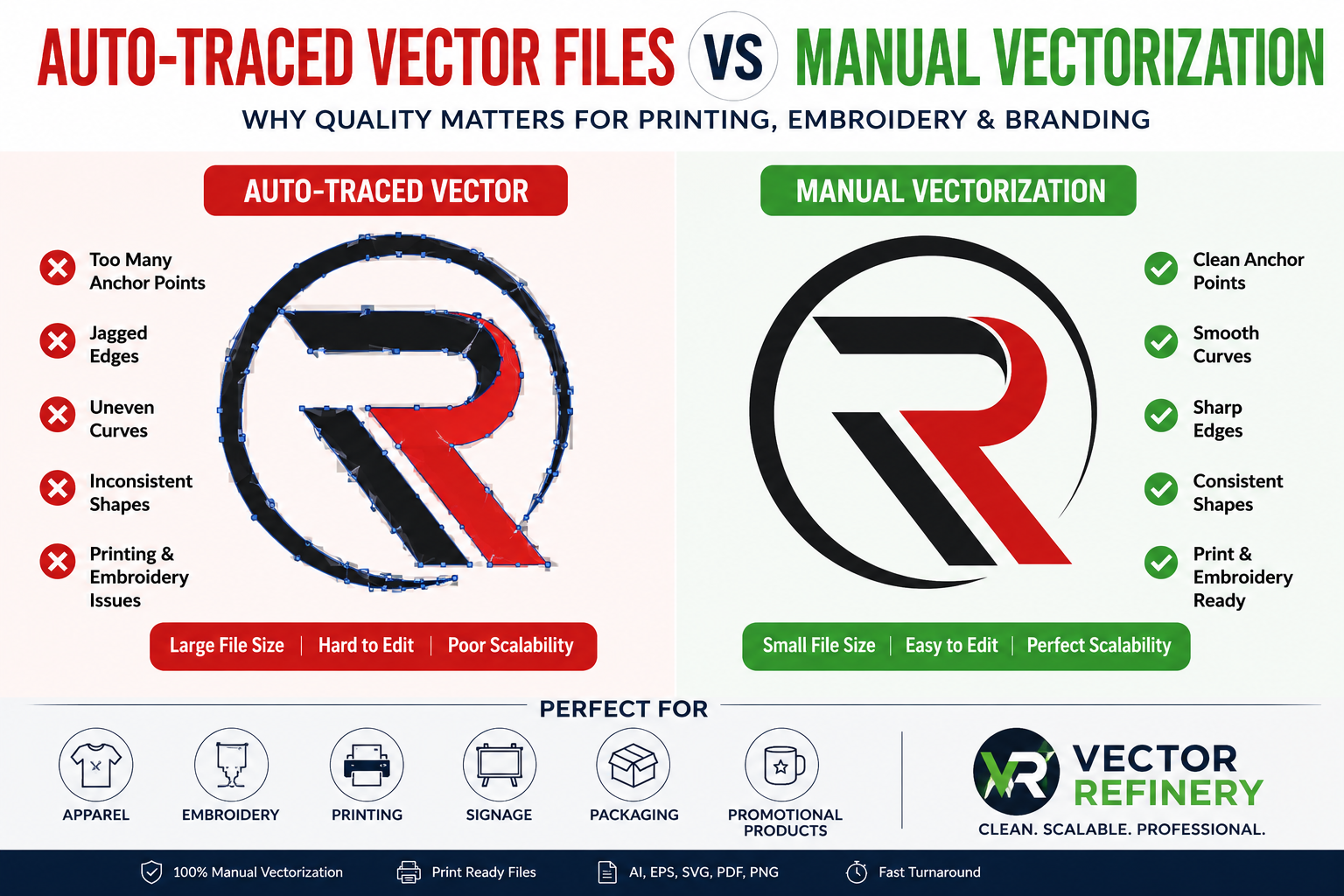
Auto traced vector files are widely used to convert logos and images into vector format quickly. However, auto traced vector files often contain hidden issues that can affect printing, embroidery, and production quality. Many business owners believe that converting a logo into a vector file is as simple as clicking an “Auto Trace” button. While automated tools can create vector artwork quickly, the resulting files often contain hidden issues that lead to printing, embroidery, and production problems.
If your logo will be used on apparel, signs, packaging, promotional products, or large-format printing, the quality of the vector file matters more than most people realize.
In this guide, we explain why auto-traced vector files can create production issues and why professional manual vectorization remains the preferred solution.
What Is an Auto-Traced Vector File?
Auto-tracing is a software-generated process that converts raster images such as PNG, JPG, JPEG, or screenshots into vector artwork.
Popular tools include:
- Adobe Illustrator Image Trace
- CorelDRAW PowerTRACE
- Online Vector Converters
- AI-Based Vector Generators
These tools attempt to recreate shapes automatically, but they cannot understand design intent the way a professional designer can.
Common Problems With Auto-Traced Vector Files
Excessive Anchor Points
Auto-tracing often generates hundreds or thousands of unnecessary anchor points.
Problems include:
- Difficult editing
- Larger file sizes
- Slower performance
- Poor scalability
Professional vector files should use clean, optimized paths.
Uneven Curves
Curves created by auto-tracing often appear:
- Jagged
- Distorted
- Inconsistent
These flaws become highly visible when artwork is enlarged.
Poor Typography
Text elements frequently become:
- Uneven
- Distorted
- Misaligned
This can weaken overall brand presentation.
Printing Issues
Poor vector construction may cause:
- Open paths
- Broken shapes
- Cutting errors
- Color separation issues
Many print shops reject low-quality vector files.
Embroidery Problems
Embroidery machines require simplified artwork.
Auto-traced files often produce:
- Rough stitching
- Thread breaks
- Poor detail reproduction
Why Manual Vectorization Produces Better Results
Manual vectorization involves redrawing artwork by hand using professional vector software.
Benefits include:
Smooth Curves
Designers create clean curves with minimal anchor points.
Accurate Shapes
Every element is carefully rebuilt for precision.
Better Scalability
Manual vectors remain sharp at:
- Small sizes
- Large banners
- Vehicle wraps
- Billboards
Easier Editing
Future modifications become simpler and faster.
Production-Ready Artwork
Compatible with:
- Screen Printing
- Embroidery
- Signage
- Packaging
- Promotional Products
- Laser Engraving
Industries That Require Clean Vector Artwork
Apparel Brands
Vector files ensure crisp printing and embroidery.
Sign Companies
Large-format printing demands precise artwork.
Marketing Agencies
Agencies require editable files for future campaigns.
Manufacturers
Packaging and product branding require scalable graphics.
Sports Teams
Merchandise and uniforms depend on production-ready vectors.
Signs Your Logo Needs Manual Vectorization
You should consider professional vectorization if:
✔ Your logo only exists as PNG or JPG
✔ The artwork appears blurry when enlarged
✔ A printer requested AI, EPS, SVG, or PDF files
✔ Your embroidery company rejected the artwork
✔ Existing vector files contain messy paths
✔ Colors appear inconsistent during printing
Recommended File Formats
Professional vector artwork should include:
Vector Formats
- AI
- EPS
- SVG
Raster Export Formats
- Transparent PNG
- High-Resolution JPG
These formats support both digital and print applications.
Frequently Asked Questions
What is the difference between auto-tracing and manual vectorization?
Auto-tracing uses software to convert images automatically, while manual vectorization involves professionally redrawing artwork for higher quality and cleaner paths.
Are auto-traced vector files suitable for printing?
Simple graphics may work, but most professional printing projects benefit from manually created vector artwork.
Why do printers request AI or EPS files?
AI and EPS files contain editable vector paths that remain sharp at any size.
Can you convert a low-resolution logo into a vector?
Yes. A professional designer can manually recreate low-resolution artwork as scalable vector graphics.
What file formats will I receive?
Most projects include AI, EPS, SVG, PDF, PNG, and JPG files.
Is manual vectorization better for embroidery?
Yes. Clean paths and simplified shapes create significantly better embroidery results.
How long does vectorization take?
Most logo vectorization projects are completed within 24–48 hours depending on complexity.
Can a blurry PNG be converted into a clean vector file?
Yes. Manual recreation can produce a clean, print-ready vector even from low-quality artwork.
Do vector files lose quality when enlarged?
No. Vector graphics remain sharp regardless of size.
Why is manual vectorization more expensive?
Manual vectorization requires professional skill and careful reconstruction, resulting in higher-quality artwork.
Conclusion
Auto-tracing may seem convenient, but it often creates hidden problems that become expensive during production. For businesses that rely on printing, embroidery, packaging, signage, or marketing materials, manually recreated vector artwork provides superior quality, cleaner paths, and reliable results.
Investing in professional vectorization ensures your logo remains scalable, editable, and production-ready for years to come.
