

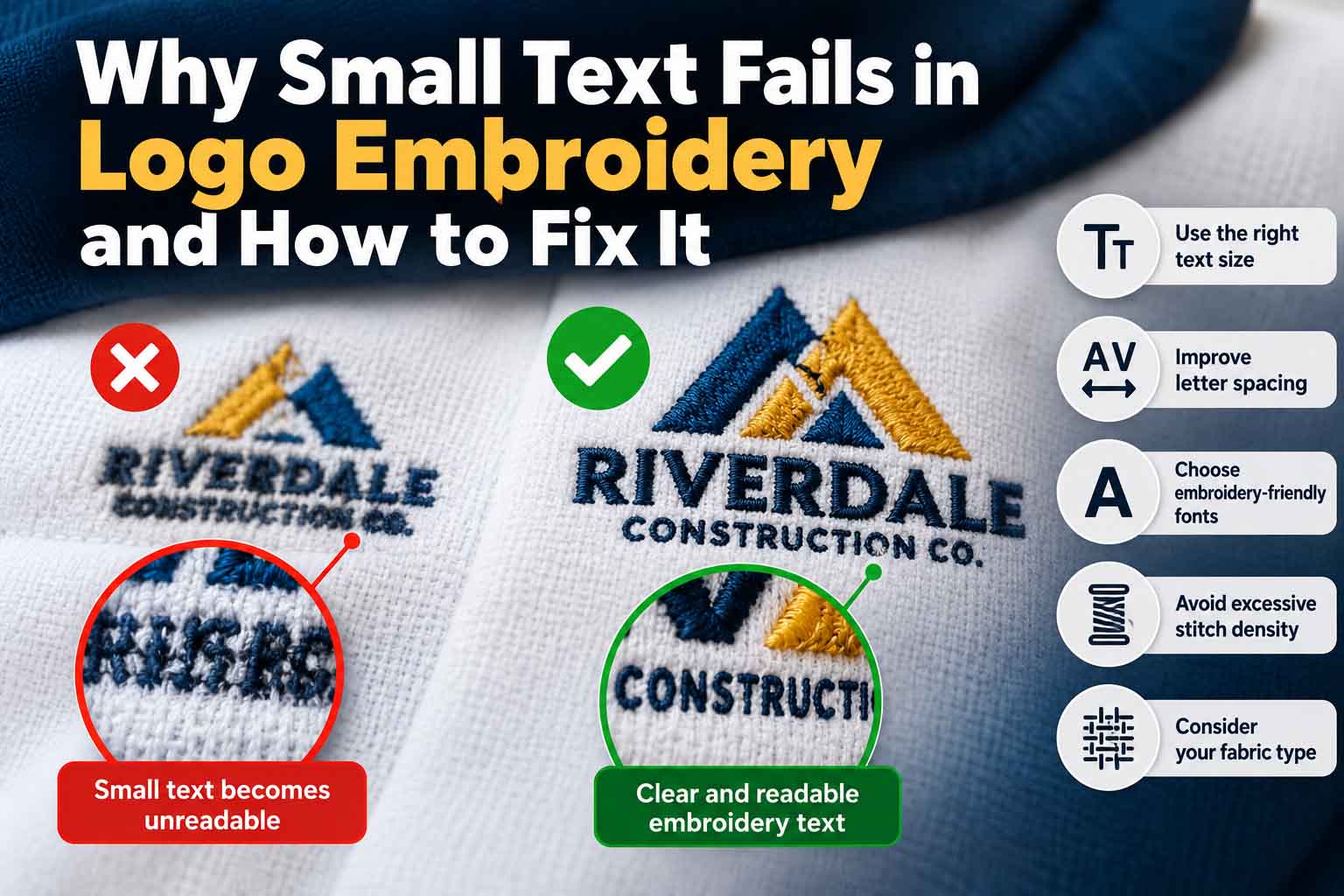
Small text embroidery problems are one of the most frustrating challenges when converting a professional business logo into stitched artwork. A company name or tagline may look perfectly sharp on a computer screen, yet become difficult to read when embroidered onto a polo shirt, cap, jacket, or uniform.
Letters that appear clean in digital artwork can become crowded, uneven, or completely unreadable once thread is applied to fabric. Tiny spaces inside letters may close, delicate strokes may disappear, and closely positioned characters can merge together.
These issues occur because embroidery has physical limitations that do not exist in digital design. Thread thickness, needle size, stitch density, fabric texture, and lettering construction all influence the final appearance.
Fortunately, many small text embroidery problems can be prevented through proper artwork preparation, appropriate lettering dimensions, and professional embroidery digitizing.
In this guide, we’ll explore why tiny embroidered letters fail, how to improve their readability, and how to prepare clean vector artwork for embroidery production.
Why Small Text Fails in Logo Embroidery
A logo designed for digital or printed applications does not automatically translate into embroidery.
Digital typography relies on pixels or scalable vector paths. Embroidery, however, reproduces shapes using physical stitches.
Every letter requires enough space for thread placement, stitch movement, and recognizable letterforms.
When lettering becomes too small, several issues may occur:
- Small letters merge together.
- Thin strokes disappear or become inconsistent.
- Interior openings close.
- Curved letters lose their intended shapes.
- Thread buildup creates uneven lettering.
- Fabric movement distorts the original design.
For example, a company logo may include a large business name with a much smaller tagline underneath. The tagline may remain perfectly readable in print but become illegible when embroidered at a standard chest-logo size.
The problem is not always the embroidery machine. In many cases, the original artwork simply contains details that are too small for the intended application.
Understanding these limitations is the first step toward improving embroidery text readability.
1. Minimum Lettering Size: How Small Is Too Small?
One of the most important considerations in logo embroidery is the actual physical height of the lettering.
A font that appears readable at 400% zoom in Adobe Illustrator may be unsuitable when reduced to just a few millimeters.
The minimum practical size depends on the thread, font, fabric, digitizing method, and machine setup.
According to Madeira’s technical guidance on small embroidery lettering, standard 40-weight thread typically requires lettering around 6–7 mm high, while finer 60-weight thread can support lettering around 3 mm under suitable conditions.
These figures are useful production references, not universal guarantees.
Minimum Embroidery Text Size Comparison
| Thread or lettering condition | Approximate lettering height | Production considerations |
|---|---|---|
| Standard 40-weight thread | 6–7 mm | Common starting range for small block lettering |
| Fine 60-weight thread | Around 3 mm | Requires suitable digitizing and needle selection |
| Ultra-fine 75-weight thread | Below 3 mm may be possible | Specialist production and testing required |
| Decorative serif or script lettering | Usually larger | Fine details need additional space |
| Textured or stretchy fabric | Often larger | Surface movement may reduce readability |
Important: These are approximate guidelines. The final lettering size should always be confirmed through a physical embroidery sample.
How to Fix Lettering That Is Too Small
Start by measuring the text at its intended finished size.
If the lettering is too small, consider increasing the overall logo dimensions, enlarging the text independently, or preparing a simplified embroidery variation.
Avoid assuming that higher-resolution artwork will solve the problem.
A clean vector file improves artwork accuracy, but it cannot eliminate the physical limitations of stitching.
For logos that need cleaner outlines or more consistent letter geometry, professional logo vectorization services can provide a more reliable source for further production preparation.
2. Thin Fonts and Decorative Lettering Cause Readability Problems
Not every font is suitable for small embroidery.
Thin serif fonts, delicate scripts, and highly decorative typefaces often contain narrow strokes, sharp corners, and tiny details.
These features may look elegant on websites, packaging, or business cards but become difficult to reproduce with thread.
For example, a high-contrast serif font may have thick vertical strokes and extremely thin horizontal lines.
When embroidered at a small size, the thicker strokes may remain visible while the thinner sections become distorted.
This can make the lettering appear inconsistent and reduce the professional appearance of the logo.
Choosing Fonts for Small Embroidery
Fonts with the following characteristics are generally easier to reproduce:
- Consistent stroke thickness.
- Clear, open letter shapes.
- Moderate character width.
- Sufficient spacing between letters.
- Minimal decorative details.
- Simple curves and corners.
Clean sans-serif fonts and specially digitized embroidery alphabets can provide a useful starting point.
However, the font’s actual construction matters more than its general classification.
Wilcom’s custom embroidery font guidance explains why letter shapes, narrow details, and spacing should be evaluated before digitizing.
Should You Change the Original Brand Font?
Not necessarily.
When working with an established company logo, maintaining the approved typography is important.
Instead of immediately replacing the font, a designer can review whether subtle adjustments to spacing, stroke width, or letter openings will improve its suitability for embroidery.
If significant changes are necessary, an approved embroidery-specific version may be the better solution.
3. Tight Letter Spacing Makes Embroidered Words Merge
Insufficient spacing between characters is another common cause of small text embroidery problems.
In digital design, tightly kerned typography can create a refined and compact appearance.
But embroidery threads occupy physical space, and fabric movement can further reduce the visible gaps between characters.
As a result, two letters that appear separate in the original artwork may touch once stitched.
This is especially common in condensed wordmarks and small uppercase lettering.
How to Improve Embroidery Letter Spacing
First, inspect the lettering at its intended physical size.
Look closely at narrow spaces between individual characters rather than relying only on the overall word appearance.
Where necessary, slightly increase spacing between crowded letter pairs.
The goal is to maintain visual balance while providing enough separation for clean stitching.
Spacing adjustments should be evaluated alongside the digitized stitch structure.
Excessive spacing can weaken the appearance of the original logo, so changes should remain controlled and intentional.
4. Small Openings Inside Letters Become Closed
Letters such as A, B, D, O, P, a, and e contain interior openings known as counters.
These negative spaces are essential for recognizing individual characters.
When lettering is reduced too much, the openings can become extremely narrow.
During embroidery, surrounding stitches may crowd into these spaces, making the letters appear filled or distorted.
For example, a small lowercase “e” may lose its horizontal opening and become difficult to distinguish.
How to Fix Closed Letter Counters
Inspect the letter outlines before digitizing.
Check whether the interior openings remain visible at the intended production size.
Possible improvements include:
- Enlarging narrow counters.
- Simplifying unnecessary curves.
- Adjusting extremely thin connecting strokes.
- Increasing the overall lettering size.
- Slightly modifying character proportions.
These adjustments should preserve the original typography as closely as practical.
If the logo was supplied as a blurry or pixelated image, rebuilding the lettering as clean vector shapes may also make its geometry easier to inspect.
For additional background, read our guide on how to fix a pixelated logo for printing.
Although that article focuses on print artwork, the underlying importance of clean source geometry is relevant to preparing a logo for multiple production methods.
5. Excessive Stitch Density Creates Thread Buildup
Stitch density describes how closely stitches are positioned.
Appropriate density helps produce solid, consistent embroidery. However, excessive density can cause thread buildup, particularly in small lettering.
When too many stitches occupy a limited area, letters may become thicker than intended.
This can close narrow openings, reduce spacing, and make the embroidery surface uneven.
Poorly adapted underlay or pull compensation can contribute to similar problems.
How to Reduce Stitch Buildup
The embroidery digitizer should evaluate stitch spacing, underlay, stitch direction, and pull compensation for the intended fabric and thread.
Reducing stitch density without considering the rest of the design is not always effective.
The correct settings depend on the lettering style, fabric stability, and embroidery equipment.
Wilcom’s production-ready lettering guidance explains why different fabrics may require different embroidery settings.
A physical test stitch-out is essential before approving final production.
Get your logo print-ready in 24 hours
Upload your PNG, JPG, or screenshot. A free assessment with exact price and turnaround is included before you pay anything.
6. Fabric Texture Can Make Small Embroidery Text Unreadable
Even well-prepared lettering can produce different results on different materials.
A logo that stitches clearly on stable woven fabric may become less readable on textured or stretchy garments.
Fabric movement, surface texture, and thread penetration all affect the finished appearance.
Common Fabric Challenges
Polo shirts: Piqué fabric has a textured surface that can interfere with fine lettering.
Stretch garments: Fabric movement can distort character shapes if stabilization is inadequate.
Fleece: Raised fibers may cause fine stitches to sink into the material.
Caps: Curved surfaces, seams, and hooping limitations can make small lettering more challenging.
Jackets: Material thickness, coatings, and construction may affect stitching behavior.
How to Improve Results on Difficult Fabrics
Choose suitable stabilization and hooping methods.
For certain textured fabrics, a water-soluble topping may help prevent fine stitches from sinking into the surface.
However, stabilizers cannot make extremely small or complicated lettering automatically suitable for embroidery.
The artwork must still be appropriate for the requested finished dimensions.
7. Why Resizing an Embroidery File Can Damage Small Lettering
A common production mistake is reducing an existing embroidery design without reviewing its stitch structure.
Suppose a logo was originally digitized for a large jacket application.
The same file is then reduced to fit a small chest position.
Although the overall proportions may remain similar, the original stitch settings may no longer be suitable.
Stitches can become too short, lettering can become crowded, and internal details may lose definition.
Wilcom explains the limitations of scaling embroidery fonts, including how reducing lettering below its recommended range can negatively affect stitch quality.
Better Solution
Prepare the source artwork at the intended production dimensions.
If substantial resizing is required, the embroidery design may need to be re-digitized or adjusted for the new size.
For logos with tiny taglines or complicated typography, a separate small-format version may be necessary.
8. How to Prepare Small Logo Lettering in Adobe Illustrator
Clean vector artwork provides an accurate foundation for embroidery digitizing.
Adobe Illustrator allows designers to inspect letter geometry, adjust spacing, and organize the artwork before it enters the embroidery workflow.
However, an Illustrator file is not itself a finished embroidery machine file.
Step 1: Set the Actual Embroidery Dimensions
Begin by confirming the finished logo size in millimeters.
Avoid judging small lettering only while zoomed in.
Review the artwork at its intended physical dimensions.
Step 2: Keep the Original Artwork Unchanged
Preserve a copy of the approved logo.
Create a separate production version for any necessary adjustments.
This protects the original brand identity and makes revisions easier to compare.
Step 3: Convert Text to Outlines
When preparing an outlined production copy, select the lettering and use:
Type → Create Outlines
This converts the text into editable vector shapes.
Keep a separate version with editable text whenever possible.
Step 4: Inspect Letter Geometry
Check the smallest characters for narrow openings, unwanted overlaps, irregular curves, and inconsistent stroke widths.
Use Illustrator’s Outline View to inspect the underlying paths.
Step 5: Adjust Spacing and Simplify Details
Make controlled adjustments where necessary.
Focus on improving readability rather than redesigning the logo.
Step 6: Organize the Artwork
Separate relevant elements into clearly named layers or groups.
Remove unused objects and unwanted geometry.
Keep the production artwork clean and easy to interpret.
Step 7: Export the Vector Source
Depending on the embroidery provider’s requirements, supply AI, EPS, SVG, or vector PDF files.
If your original artwork is a low-resolution JPG or PNG, our PNG/JPG to Vector service can help rebuild the source as clean, scalable vector artwork.
Remember that vector conversion and embroidery digitizing are separate processes.
The embroidery provider must still create and test the machine-compatible stitch file.
9. Vector Artwork vs Embroidery Digitizing
Many businesses assume that converting a logo into SVG or AI format automatically makes it ready for embroidery.
In reality, these processes serve different purposes.
| Vector artwork preparation | Embroidery digitizing |
|---|---|
| Recreates clean logo outlines | Converts artwork into stitch instructions |
| Corrects letter shapes | Determines stitch types |
| Improves spacing and geometry | Controls stitch density |
| Removes unwanted overlaps | Configures underlay and stitch direction |
| Produces scalable vector artwork | Produces machine-compatible embroidery files |
| Supports multiple production uses | Prepares the design for stitching |
Professional embroidery often benefits from both accurate source artwork and properly configured digitizing.
At Vector Refinery, we focus on manual logo vectorization and precision vector refinement, helping businesses prepare cleaner source artwork for professional production workflows.
10. Should You Remove a Tiny Tagline from an Embroidered Logo?
Many business logos contain a company name, symbol, and smaller supporting tagline.
While the complete arrangement may work well on a website or brochure, it may not fit comfortably into a small embroidered application.
Trying to preserve every detail at an impractical size can reduce overall readability.
A better solution may be to create an approved embroidery-specific variation.
For example, a company might use the complete logo for large applications, a logo without the tagline for smaller garments, and a symbol-only variation for limited spaces.
This approach maintains brand consistency while respecting the practical limitations of embroidery.
Any modification to the approved logo should be reviewed by the brand owner.
11. Small Text Embroidery Troubleshooting Checklist
Before sending your logo for embroidery production, review the following:
- Is the smallest text large enough for the intended thread?
- Are the letters readable at actual physical size?
- Do interior openings remain clearly visible?
- Is there enough space between adjacent characters?
- Are thin strokes practical for stitching?
- Is the artwork free from unwanted overlaps?
- Has the source logo been prepared as clean vector artwork?
- Has the embroidery file been digitized for the correct dimensions?
- Have the fabric and stabilization requirements been considered?
- Has a physical stitch sample been tested?
These checks can help identify problems before full production begins.
Get your logo print-ready in 24 hours
Upload your PNG, JPG, or screenshot. A free assessment with exact price and turnaround is included before you pay anything.
Frequently Asked Questions
Why does small text fail in logo embroidery?
Small text often fails because the lettering contains details that cannot be reproduced clearly with thread at the requested size. Thread thickness, stitch density, letter spacing, and fabric movement can all contribute.
What is the minimum text size for embroidery?
For standard 40-weight thread, approximately 6–7 mm is a commonly cited practical range. Finer threads and specialized digitizing may support smaller lettering, but actual results require testing.
Can a thin font be embroidered?
Yes, but very thin lettering may require enlargement or careful adaptation. Some delicate fonts are unsuitable for extremely small embroidery applications.
How can I make tiny embroidered letters more readable?
Increase lettering size where possible, improve spacing, preserve open counters, simplify unnecessary details, and ensure the embroidery file is digitized for the intended fabric and dimensions.
Can Adobe Illustrator fix embroidery text problems?
Illustrator can help correct vector outlines, spacing, and letter geometry. However, stitch density and other machine-specific settings must be addressed during embroidery digitizing.
Is an SVG file ready for embroidery?
No. SVG is a vector graphics format. It can be used as source artwork, but the design must be digitized into a compatible embroidery stitch format before production.
Does vectorizing a logo improve embroidery quality?
Clean vector artwork can make logo geometry easier to interpret and refine. However, the final embroidery quality also depends on digitizing, materials, equipment, and testing.
Should I remove small lettering from my embroidered logo?
If the lettering cannot be reproduced clearly at the required size, an approved simplified logo variation may be more practical.
Final Thoughts
Small text embroidery problems are usually caused by a mismatch between digital artwork and the physical limitations of stitching.
Letter size, font construction, spacing, thread thickness, fabric texture, and digitizing settings all influence the final result.
The best approach is to evaluate the artwork at its actual production size, correct problematic letter geometry, and work with an embroidery provider who can test the digitized design.
Clean vector artwork provides a reliable starting point, while proper digitizing determines how successfully that artwork can be stitched.
Need Clean Vector Artwork for Your Embroidery Logo?
At Vector Refinery, we manually recreate and refine logos into clean, scalable vector artwork while preserving the approved design.
Whether your logo contains blurry lettering, uneven outlines, unwanted overlaps, or small details that need careful preparation, we can help improve the source artwork for professional production workflows.
Explore Our Vector Services | Request a Quote
Production note: Vector artwork preparation does not replace embroidery digitizing. Final stitch quality depends on the digitizing process, fabric, thread, equipment, and physical testing.
