

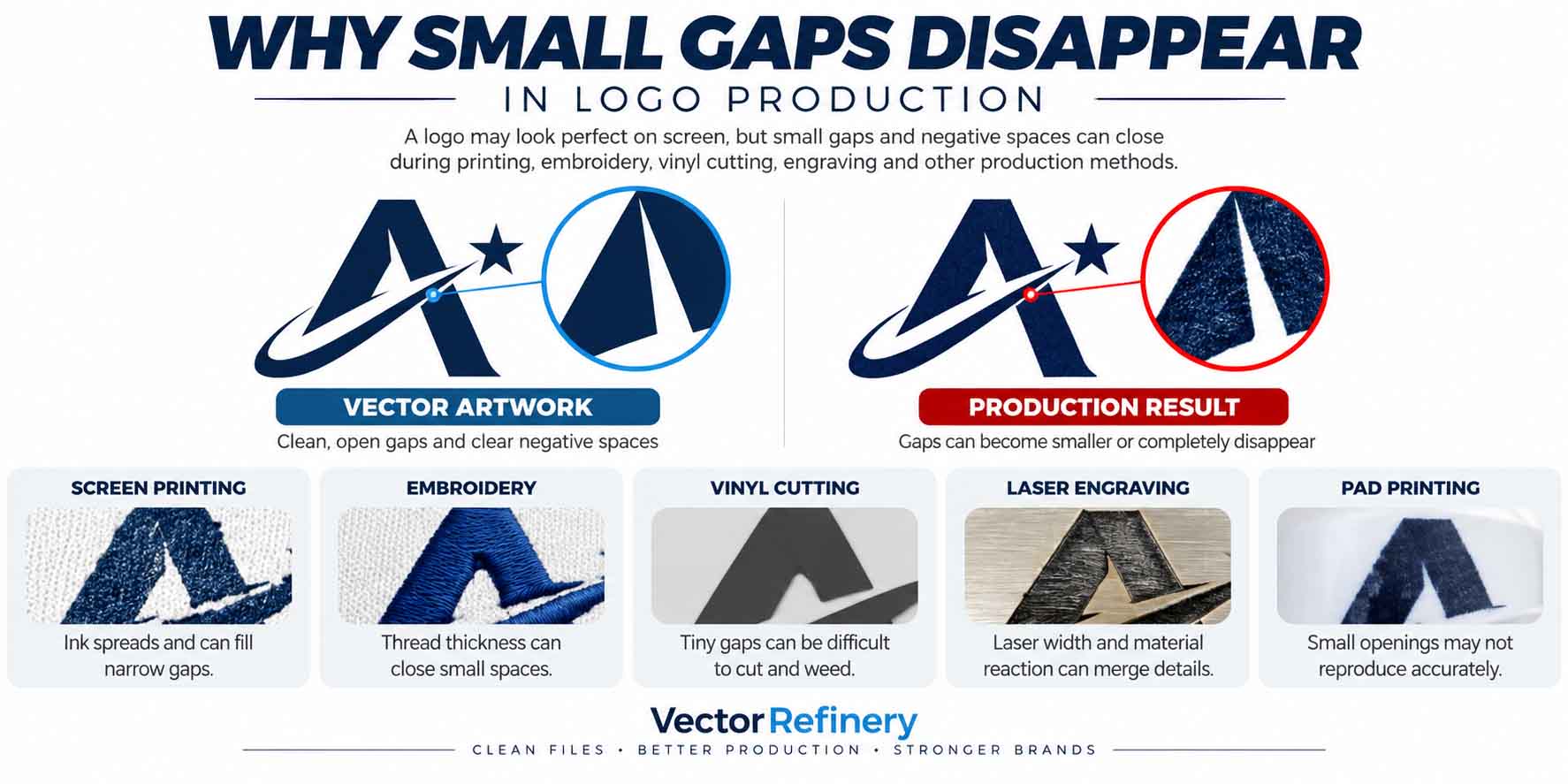
Small gaps in logo production can disappear even when a logo looks perfectly sharp and professionally prepared on screen. Negative spaces, narrow openings, and small counters inside letters can close or lose definition when artwork is screen printed, embroidered, engraved, vinyl cut, or reproduced on small promotional products.
The reason is simple: digital vector precision and physical production precision are not the same thing.
Adobe explains that vector artwork can scale from small applications such as business cards to large applications such as billboards without losing image quality. This makes vector graphics ideal for logos. However, scalability does not mean every microscopic feature can be physically manufactured. Adobe’s logo design guidance explains the scalability advantage of vector artwork, but the final reproduction still depends on the production process being used.
This distinction is critical when preparing a production-ready logo.
Vector Scalability Does Not Guarantee Production Scalability
One of the biggest misconceptions about logo files is that converting artwork to vector automatically makes every detail safe at every size.
Vectorization solves resolution problems. It allows curves, shapes, lettering, and edges to remain mathematically clean when artwork is resized. But it cannot change the physical limitations of ink, thread, cutting blades, laser beams, printing screens, or the material receiving the logo.
For example, a vector file can contain a perfectly defined 0.1 mm opening. Adobe Illustrator can display that opening accurately because the shape is mathematically defined. But if that same opening is reproduced using embroidery thread or heavy screen-printing ink, the physical production process may not be capable of preserving it.
That is why professional logo preparation should evaluate more than file format.
The designer should inspect:
- negative spaces and letter counters;
- minimum positive line thickness;
- gaps between neighboring objects;
- tiny isolated shapes;
- thin strokes;
- intricate corners;
- overlapping paths;
- unnecessary anchor points;
- final reproduction size;
- intended production method.
If your original artwork is a PNG or JPG, converting it to vector is only the first stage. Read our Screen Printing Vector Artwork Guide to understand why clean vector geometry matters for professional production.
Why Negative Space Closes During Screen Printing
Screen printing is one of the clearest examples of why small negative spaces need special attention.
Ink is physically pushed through a mesh screen onto the printing surface. The amount of detail that can be reproduced depends on factors such as artwork complexity, mesh count, ink type, exposure, and the printing setup.
ScreenPrinting.com’s technical guidance explains that finer lines, small text, and halftones generally require higher mesh counts to hold the required detail. It also notes that there is no single mesh count suitable for every job because artwork, ink, garment, and desired result all influence the decision. Read the screen-printing mesh guidance.
This has a direct effect on logo negative space.
Imagine two large printed shapes separated by a tiny opening. If the physical ink deposit causes the visible edges to expand even slightly, both sides move visually toward the opening.
The result can be:
Original vector:
Solid shape → clear gap → solid shape
After production:
Solid shape → reduced gap → solid shape
At the failure point:
Solid shape → closed gap → solid shape
The vector artwork itself may still be technically correct. The problem is that its geometry was not appropriate for the production conditions.
For a deeper explanation of artwork preparation, color separation, line thickness, and vector requirements, see our complete Screen Printing Vector Artwork Guide.
Embroidery Makes Small Negative Spaces Even More Critical
Embroidery creates a different problem because the logo is reconstructed with physical thread.
Thread has thickness. Stitches require space. Fabric moves and stretches. Stitch density can also cause neighboring elements to visually expand into small open areas.
This makes tiny counters inside letters such as A, B, D, O, P, and R particularly vulnerable.
A small letter may look completely readable in Illustrator but become much heavier after digitizing and stitching. As surrounding stitches occupy physical space, the internal opening can become smaller until it appears partially or completely closed.
Our detailed Minimum Logo Size for Embroidery Guide explains how logo size, text height, line thickness, placement, thread, fabric, and design complexity influence embroidery results.
This is also why an embroidery version of a logo sometimes needs to be slightly different from the master artwork.
Small text may need to be enlarged or removed. Narrow counters may need to be opened. Fine decorative elements may need to be simplified. Closely spaced objects may require additional separation.
These changes are not necessarily a redesign. They are production optimization intended to preserve the visual identity when the logo moves from a digital screen to physical thread.
Final Size Matters More Than Screen Zoom
A common production mistake is evaluating artwork while heavily zoomed in.
Suppose a logo appears 500 mm wide on your monitor while you are editing it. A narrow negative space looks obvious.
The actual logo, however, might be printed only 25 mm wide.
When the entire logo is reduced, every internal detail is reduced proportionally. A gap that looked substantial on-screen may become extremely small in physical output.
This is why a small logo production test should always be performed at the intended final dimensions.
If the logo will be printed 25 mm wide, inspect it at 25 mm.
If it will be embroidered approximately 3.5 inches wide, evaluate the artwork at that size.
If it will be engraved onto a pen, evaluate the actual engraving dimensions instead of judging a large Illustrator preview.
The key question is not:
“Can I see the detail when I zoom in?”
The useful question is:
“Will this detail remain recognizable at the final physical production size?”
How Small Gaps Behave in Different Logo Production Methods
Why Small Gaps in Logo Production Behave Differently Across Production Methods
| Production Method | Why Small Gaps Disappear | Common Logo Problems | Recommended Artwork Preparation |
|---|---|---|---|
| Screen Printing | Ink deposit, mesh limitations, exposure, and printing pressure can reduce very small negative spaces. | Small gaps close, fine lines become heavier, and tiny counters may fill in. | Increase critical gaps, simplify fine details, and prepare clean vector artwork. |
| Embroidery | Thread thickness, stitch density, fabric movement, and push-pull distortion affect small details. | Letter counters close, tiny text becomes unreadable, and narrow gaps become crowded. | Open small counters, strengthen thin elements, and create a simplified embroidery version. |
| Vinyl Cutting | Tiny shapes and narrow gaps can be difficult to cut, weed, transfer, and install accurately. | Small pieces may lift, disappear, tear, or become difficult to weed. | Remove micro-details, widen narrow spaces, and use simple closed vector paths. |
| Laser Engraving | Laser beam width, heat, engraving depth, and material reaction can reduce fine separation. | Fine gaps merge visually and small details lose definition. | Increase spacing, simplify fragile details, and test artwork on the actual material. |
| Pad Printing | Small reproduction size and physical ink transfer can make extremely fine openings unreliable. | Tiny gaps fill, small lettering loses clarity, and intricate details become muddy. | Use clean vector geometry, adequate spacing, and a simplified small-size version when required. |
| Small-Format Printing | Final size, ink behavior, substrate texture, and output conditions affect fine details. | Negative spaces become unclear and thin details may disappear. | Check the logo at 100% production size and enlarge critical gaps where necessary. |
Important: There is no universal minimum gap size that works for every logo production method. Safe spacing depends on the final logo size, material, equipment, ink or thread, and the production provider’s specifications.
There Is No Universal Minimum Gap Size for Every Logo
Searching for a single minimum gap size for logo printing can be misleading.
There is no universal number that applies to every logo and every manufacturing method.
Screen printing depends partly on mesh and ink. Embroidery depends on thread, stitch density, fabric, digitizing, and placement. Vinyl cutting depends on blade, material, weeding, and transfer requirements. Laser engraving depends on beam characteristics and the reaction of the substrate. Pad printing introduces another combination of ink-transfer and size limitations.
Even within screen printing, technical recommendations vary according to the amount of detail and the ink being used. ScreenPrinting.com’s guidance specifically notes that finer artwork generally requires a tighter mesh, while bold graphics and heavier ink applications can require different mesh choices.
Therefore, a professional workflow should not blindly apply one arbitrary minimum spacing number.
Instead:
Ask the production vendor for its minimum positive-line and negative-space tolerances for the exact process, substrate, and final size.
That is much more reliable than assuming one measurement will work for everything.
Positive Detail vs. Negative Detail
When checking a logo for production, designers should evaluate both positive detail and negative detail.
Positive detail is the material being reproduced—the printed line, embroidered shape, engraved area, or piece of vinyl.
Negative detail is the empty area that must remain open around or inside those elements.
Both can fail, but they fail differently.
A very thin positive line may disappear.
A very thin negative line may fill in.
This means a logo can simultaneously contain elements that are too thin to reproduce and spaces that are too narrow to remain open.
Professional vector cleanup should inspect both conditions before artwork reaches production.
Why Auto-Trace Can Create Production Problems
Automatic tracing can turn a raster image into vector paths quickly, but speed does not guarantee production quality.
Low-resolution artwork frequently contains anti-aliased edges, compression artifacts, irregular pixels, and tiny imperfections. Auto-trace may interpret these imperfections as actual geometry.
The resulting vector can contain excessive anchor points, wobbly curves, accidental micro-gaps, overlapping paths, fragmented shapes, and unnecessary details.
Those imperfections become particularly problematic in vinyl cutting, laser engraving, screen printing, and other workflows where equipment follows or interprets the actual vector geometry.
Manual vector rebuilding takes a different approach.
Instead of reproducing every damaged pixel, the artwork can be reconstructed using intentional shapes, controlled Bézier curves, clean intersections, appropriate negative space, and minimal necessary anchor points.
The objective should not simply be:
PNG → SVG
It should be:
Poor source artwork → clean, accurate, production-ready vector artwork.
One Logo May Need Multiple Production Versions
A professional logo system may include more than one production variation.
The primary logo can preserve the full visual detail for websites, presentations, packaging, and larger printing.
A simplified small-size logo can remove fragile details and increase important gaps.
An embroidery version can use stronger shapes, larger openings, and simplified details.
A one-color production version can eliminate gradients, transparency, and effects that do not translate directly to certain manufacturing processes.
An icon-only version can provide a recognizable alternative when the full logo is too detailed for an extremely small application.
Creating these versions does not weaken brand consistency. When handled carefully, it improves consistency because the brand remains recognizable instead of allowing production limitations to randomly destroy important details.
Get your logo print-ready in 24 hours
Upload your PNG, JPG, or screenshot. A free assessment with exact price and turnaround is included before you pay anything.
Production-Ready Logo Checklist
Before sending artwork to a printer, embroiderer, engraver, sign company, or promotional-product manufacturer, confirm that the file has been checked for:
✓ True vector paths rather than a raster image saved inside a vector container
✓ Clean Bézier curves and controlled anchor points
✓ Sufficient negative space between critical elements
✓ Open and readable counters inside letters
✓ Appropriate line thickness
✓ No accidental overlapping or duplicate paths
✓ Correct final production dimensions
✓ Outlined or properly handled fonts where required
✓ Flat-color version where necessary
✓ One-color black and reversed white versions
✓ Simplified artwork for extremely small applications when needed
✓ Manufacturer-specific production requirements
For screen-printing projects, use our Screen Printing Vector Artwork Guide as an additional preparation reference.
For stitched apparel, caps, patches, and uniforms, check the Minimum Logo Size for Embroidery Guide before finalizing the smallest logo version.
Why Production-Ready Vector Artwork Protects Brand Quality
The purpose of production-ready artwork is not simply to satisfy a printer’s file request.
It protects the appearance of the brand.
If negative spaces close, the logo can look heavier.
If letter counters disappear, typography can become difficult to read.
If thin lines vanish, icons can lose their intended structure.
If tiny shapes merge, the overall silhouette of the logo can change.
These problems become particularly noticeable when the same brand appears across many applications—business cards, uniforms, storefront signage, product packaging, promotional merchandise, vehicles, websites, and social media.
A properly prepared vector logo provides a reliable master from which production-specific versions can be created.
Adobe’s current Illustrator logo guidance emphasizes one of the fundamental advantages of vector artwork: a vector logo can scale across applications without the quality loss associated with pixel-based artwork. Learn more from Adobe.
But preserving mathematical sharpness is only part of professional logo preparation.
The artwork must also be engineered for the physical process that will reproduce it.
Final Takeaway
When small gaps and negative spaces disappear in logo production, the problem is often not the basic logo concept. The problem is the relationship between the artwork’s geometry and the limitations of the final production process.
A clean vector file provides the right foundation, but professional preparation goes further.
The artwork should be inspected at actual size. Critical negative spaces should remain open. Thin positive elements should remain reproducible. Complex details should be simplified when necessary, and production-specific requirements should be confirmed with the manufacturer.
A logo should not only look perfect at 1,000% zoom.
It should remain clear, recognizable, and professional when it becomes a physical product.
If your logo contains tiny gaps, disappearing details, rough curves, excessive anchor points, overlapping paths, or artwork that a printer has rejected, Vector Refinery can manually rebuild and optimize the logo into clean, production-ready vector artwork for screen printing, embroidery, signage, vinyl cutting, engraving, pad printing, and promotional-product production.
Published by Vector Refinery — Professional Manual Logo Vectorization and Production File Preparation Service. Visit vectorrefinery.com to upload your logo and get a free assessment today.
